
Free tool
Free time card calculator
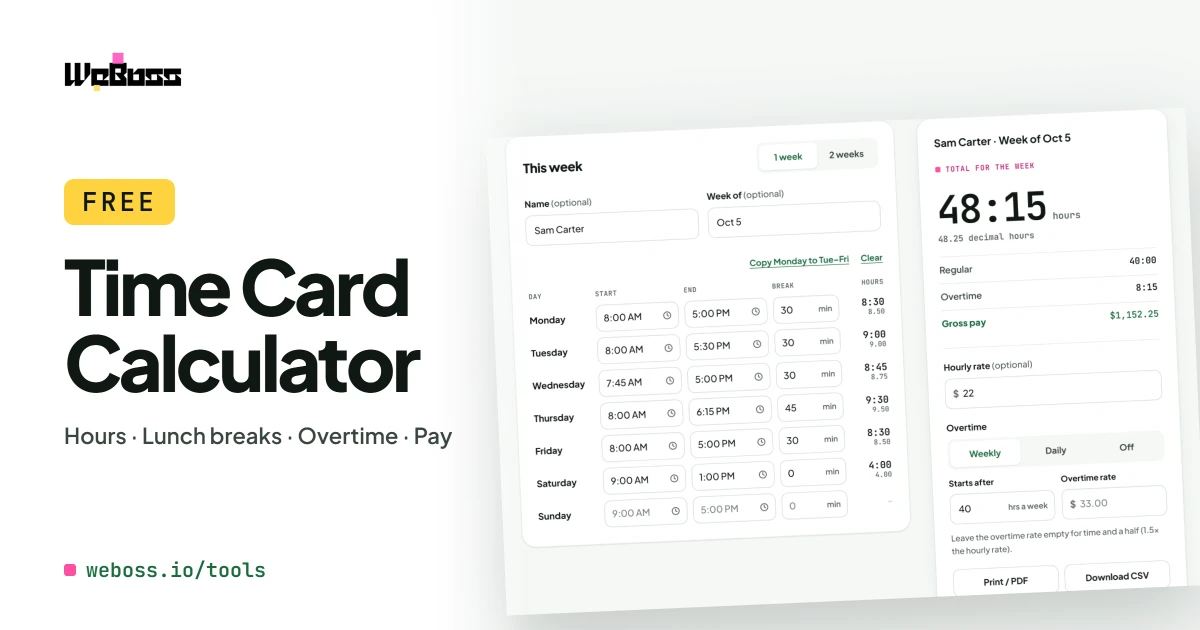
Add up hours and minutes worked for one week or two, with lunch breaks, overtime and pay.
Step by step
How to use the time card calculator
Pick one week or two
Choose 1 week, or 2 weeks for a biweekly pay period. Add a name if you like.
Enter clock in and clock out
Tap a box and use the sliders, or type 855, 9a or 17:30.
Take off the lunch break
Type each day's unpaid break in minutes.
Add pay and overtime
Type an hourly rate. Choose weekly or daily overtime and your own overtime rate.
Print or save the time card
Print it, save it as a PDF, or download a CSV for Excel or Google Sheets.
What it does
A timesheet calculator with lunch breaks, overtime and pay
Call it a timecard, a timesheet, a time clock or a work hours calculator. It adds up the hours and minutes you worked and turns them into pay.
-
Lunch breaks taken off
Unpaid break minutes come off each day before the total.
-
Hours and minutes, and decimal
Every total shows both ways: 7:45 and 7.75 for payroll.
-
Weekly or biweekly
One week, or two weeks for a biweekly pay period, each with its own total.
-
Overtime, your rules
After 40 hours a week, 8 hours a day, or any number you set.
-
Gross pay worked out
Regular and overtime pay from your hourly rate, or your own overtime rate.
-
Night shifts and military time
10 PM to 6 AM counts as 8 hours. 24-hour time like 17:30 works too.
-
Printable time card
Print one clean page with signature lines, save a PDF, or download a CSV.
-
Free, private, on any phone
No sign-up and no app. Your hours stay in your browser.
The maths
How to calculate hours and minutes worked
- Each day: clock-out time minus clock-in time, minus the unpaid break.
- Example: 8:55 AM to 5:30 PM with a 30-minute lunch is 8 hours 5 minutes, or 8.08 hours.
- Weekly overtime: hours past 40 in each week (the US federal rule). On a biweekly time card each week is counted on its own.
- Daily overtime: hours past 8 in each day. Some states, such as California, add rules this does not cover, like double time.
- Gross pay: regular hours × hourly rate, plus overtime hours × overtime rate. Taxes and deductions are not taken off.
It is a calculator, not payroll advice. Check your state's overtime rules before paying staff.
Minutes to decimal hours chart
| Min | Hours | Min | Hours | Min | Hours | Min | Hours |
|---|---|---|---|---|---|---|---|
| 1 | 0.02 | 16 | 0.27 | 31 | 0.52 | 46 | 0.77 |
| 2 | 0.03 | 17 | 0.28 | 32 | 0.53 | 47 | 0.78 |
| 3 | 0.05 | 18 | 0.30 | 33 | 0.55 | 48 | 0.80 |
| 4 | 0.07 | 19 | 0.32 | 34 | 0.57 | 49 | 0.82 |
| 5 | 0.08 | 20 | 0.33 | 35 | 0.58 | 50 | 0.83 |
| 6 | 0.10 | 21 | 0.35 | 36 | 0.60 | 51 | 0.85 |
| 7 | 0.12 | 22 | 0.37 | 37 | 0.62 | 52 | 0.87 |
| 8 | 0.13 | 23 | 0.38 | 38 | 0.63 | 53 | 0.88 |
| 9 | 0.15 | 24 | 0.40 | 39 | 0.65 | 54 | 0.90 |
| 10 | 0.17 | 25 | 0.42 | 40 | 0.67 | 55 | 0.92 |
| 11 | 0.18 | 26 | 0.43 | 41 | 0.68 | 56 | 0.93 |
| 12 | 0.20 | 27 | 0.45 | 42 | 0.70 | 57 | 0.95 |
| 13 | 0.22 | 28 | 0.47 | 43 | 0.72 | 58 | 0.97 |
| 14 | 0.23 | 29 | 0.48 | 44 | 0.73 | 59 | 0.98 |
| 15 | 0.25 | 30 | 0.50 | 45 | 0.75 | 60 | 1.00 |
Divide minutes by 60. So 7 hours 45 minutes is 7.75 hours, and 0.25 of an hour is 15 minutes.
Who it is for
A work hours calculator for payroll and paychecks
Employees
Check your hours against your paycheck before payday.
Small business owners
Total a crew's payroll hours for the week or the pay period, without a spreadsheet.
Contractors and freelancers
Add up billable hours and hand the client a clean sheet.
How do I calculate hours and minutes worked on a time card?
For each day, take the clock-out time minus the clock-in time and subtract the unpaid break. Add the days together for the week. This time card calculator does it as you type and shows the total as hours and minutes and as decimal hours for payroll.
How do I use the time card calculator with a lunch break?
Type the unpaid lunch break in minutes in the Break box for that day, for example 30 for a 30-minute lunch. It is subtracted from that day's hours. If there were several unpaid breaks, add them together and type the total. Leave paid breaks out, because paid time counts as hours worked.
Does it work for a biweekly (two-week) pay period?
Yes. Choose 2 weeks at the top of the time card. Each week gets its own total, weekly overtime is counted inside each week, and the pay period total and gross pay cover both weeks. It prints on one page.
How do I convert minutes to decimal hours?
Divide the minutes by 60. 15 minutes is 0.25, 30 minutes is 0.50 and 45 minutes is 0.75, so 7 hours 45 minutes is 7.75 hours. Going the other way, multiply by 60: 0.22 of an hour is about 13 minutes and 0.42 of an hour is about 25 minutes. The chart on this page lists every minute.
How is overtime worked out?
You choose. Weekly overtime counts hours past 40 in each week, which is the US federal rule. Daily overtime counts hours past 8 in each day. You can change the number of hours, and overtime is paid at 1.5 times the hourly rate unless you type your own overtime rate.
Can I use military time or type times quickly?
Yes. Type 17:30, 1730, 855, 9a or 5pm, or use the sliders. If a clock-out time has no AM or PM and is earlier than the clock-in, it is read as the afternoon, so 9 to 5 is eight hours. A shift that ends after midnight is counted into the next day.
Is there a printable time card, or a PDF?
Yes. Print opens a clean one-page time card with the name, the dates, each day, the totals and signature lines for the employee and supervisor. Choose "Save as PDF" in the print window to keep a PDF.
Can I open the timesheet in Excel or Google Sheets?
Yes. Download CSV gives a file with each day, the hours in both formats, the totals and the pay. It opens in Excel, Google Sheets and Numbers.
Is the time card calculator free, and is my data saved?
It is free with no sign-up and no app to install. Your hours are kept in your browser on this device so they are still here when you come back. Nothing is sent to WeBoss. Press Clear to remove them.
Get started